Soterre 3.2 - Power BI Folders
Автор: MotioVideos
Загружено: 2026-01-12
Просмотров: 8
Описание:
This video demonstrates Power BI folder support in Soterre. Within a Power BI workspace that contains standard content as well as folders and subfolders, Soterre's explore view lists workspace settings and the workspace app at the top, followed by folders and content. Folder content in Soterre is shown similarly to how it appears in Power BI.
Key features regarding folder support in Soterre include:
Versioning:
New and updated content can be versioned at the workspace or folder level.
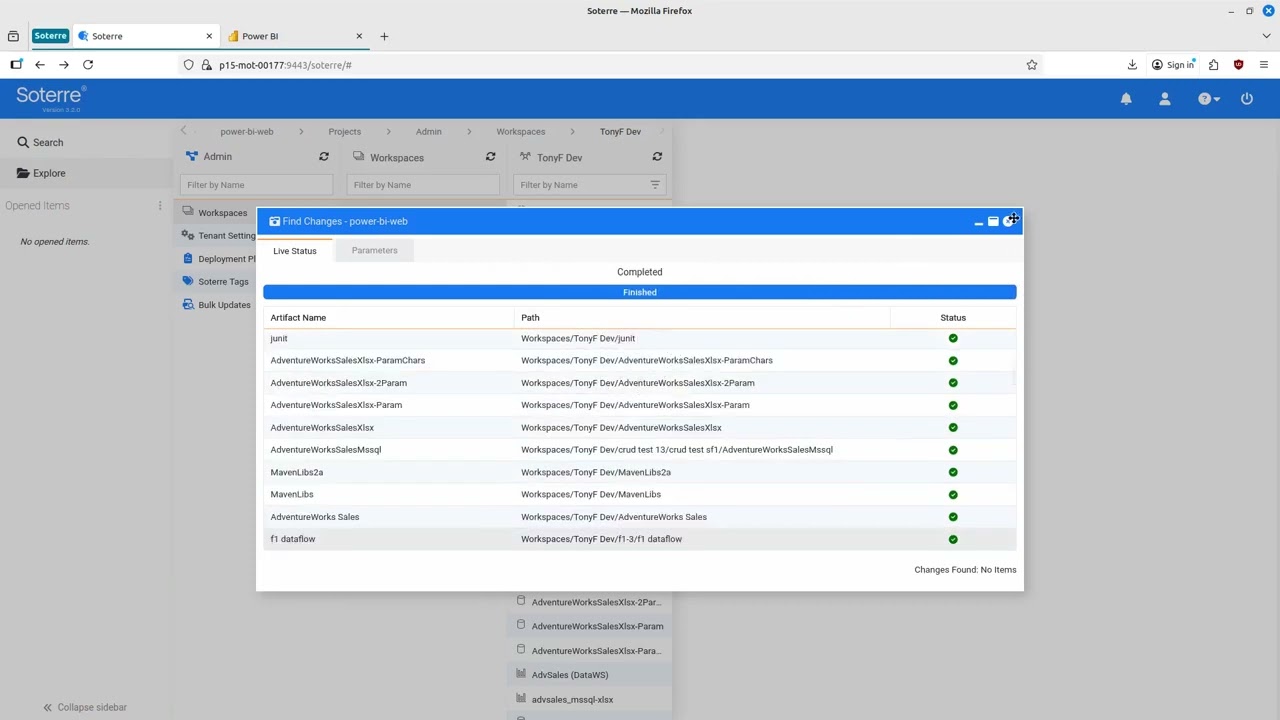
Running "find changes" at the workspace level versions all workspace content.
Running "find changes" on a folder versions only that folder and its contents.
The "find changes" window displays the full path for an artifact, including any folders and subfolders.
Searching:
Users can search for content within a specific folder by clicking "search from here". This opens a new search panel, limiting the search to artifacts inside the selected folder recursively, using any supported search criteria.
Timeline:
Users can view the timeline for a folder in the explore pane, which shows all changes that have occurred for the folder and any descendants.
Deployment:
Deployment can be limited to a selected folder. In an example where a folder is deployed from a development (dev) workspace to a quality assurance (QA) workspace where the folder did not exist, any folders and child artifacts that do not exist are created. The lineage view confirms that the created reports point to the correct semantic model in the target workspace.
Повторяем попытку...
Доступные форматы для скачивания:
Скачать видео
-
Информация по загрузке: