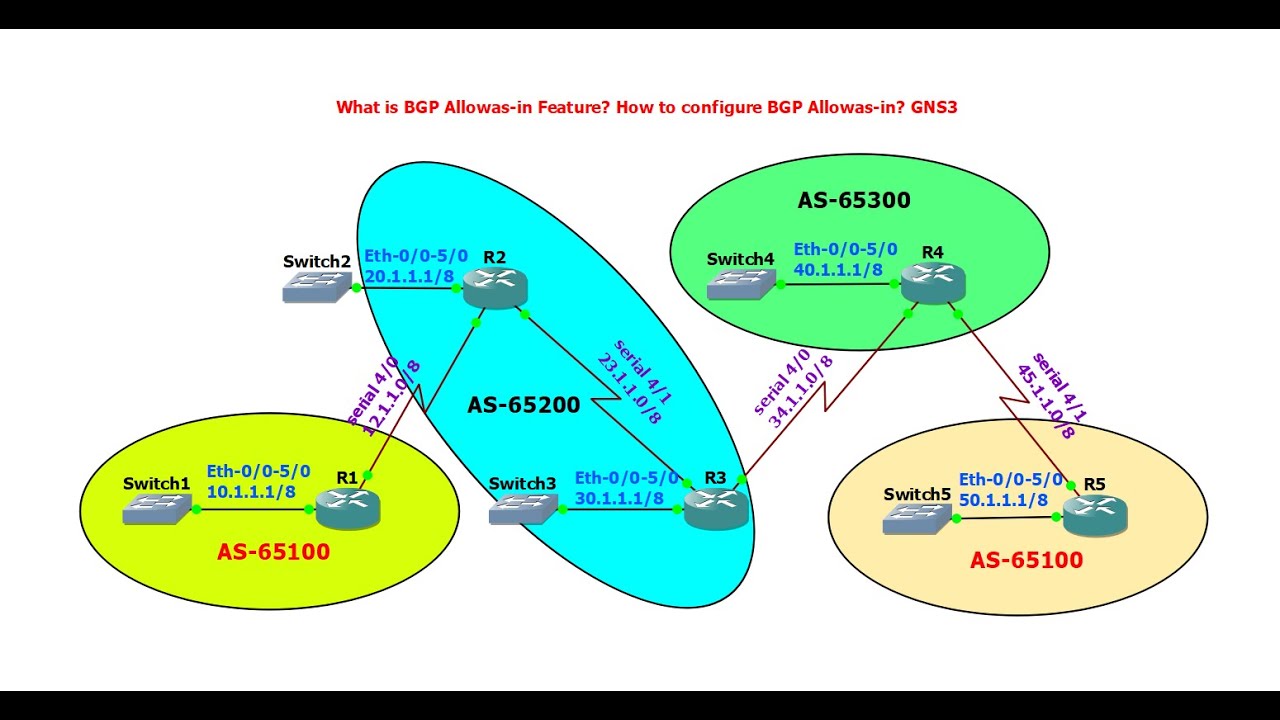
What is BGP Allowas-in Feature? How to configure BGP Allowas-in? GNS3
Автор: internetworks
Загружено: 2025-02-23
Просмотров: 487
Описание:
What is BGP Allowas-in Feature? How to configure BGP Allowas-in? GNS3
BGP Allowas-in is a configuration option in Border Gateway Protocol (BGP) routing that allows a router to accept routes with its own AS (Autonomous System) number in the AS_PATH attribute.
There's a risk of creating routing loops if not managed properly. It should be used cautiously and with a clear understanding of network topology.
Purpose: Normally, BGP prevents loops by rejecting routes that contain the local AS number in the AS_PATH. However, in scenarios like multi-homed environments or when dealing with MPLS VPNs, you should allow routes to come back into your AS through different paths.
Functionality: When you configure allowas-in, you specify how many times your AS number is allowed to appear in the AS_PATH. This number can be set between 1 to 10, although this varies by router vendor and model. For example, setting allowas-in 2 would allow routes with up to two instances of your AS number in the path.
Usage Scenario:
Multi-homed Networks: If you have connections to the same ISP in different locations, allowas-in can prevent unnecessary route blackholing by allowing these routes back into your network.
MPLS VPNs: In scenarios where customer routes are sent through a service provider network and back, allowas-in ensures these routes are not dropped.
Configuration Example (Cisco IOS-like syntax):
plaintext
router bgp 65100
neighbor 12.1.1.2 remote-as 65200
neighbor 12.1.1.2 allowas-in 2
end
To allow the re-advertisement of all prefixes that contain duplicate ASNs, use the neighbor allowas-in command in router configuration mode in Router
Risks:
There's a risk of creating routing loops if not managed properly. It should be used cautiously and with a clear understanding of network topology.
It can also lead to suboptimal routing if not configured correctly.
Best Practices:
Use sparingly and only where necessary.
Monitor BGP updates closely when employing this feature.
Combine with route-maps or other BGP policies to control which routes are accepted.
This configuration can significantly affect network reachability and BGP convergence, so it should be deployed with a good understanding of BGP dynamics and network design.
Free Tutorials Theories and Labs
1. Complete CCNA CCNP and CCIE
https://www.internetworks.in/
2. CCIE LABs
https://ccie.internetworks.in/
3. MPLS full course
https://mpls.internetworks.in/
4. DMVPN
https://mpls.internetworks.in/2021/10...
5. QoS
https://qos.internetworks.in/
6. IPSec
https://www.internetworks.in/p/100-fr...
Social media
linkdin: / edgar-c-francis-42b326178
twitter: https://twitter.com/Edgarcfrancis?t=a...
Instagram: / edgar_c_francis
Facebook : / internetworks.in
#cisco #ciscogateway #cisconetworking #ciscosecure #ciscosecurity #ciscocertification #ciscopartners #ciscocert #ccna #ccnacertification #ccnatraining #networksecurity #bgproducts #networkengineer #networkadministration #ccie #ccna #ccnp #networkinfrastructure #internetprotocol
Повторяем попытку...
Доступные форматы для скачивания:
Скачать видео
-
Информация по загрузке:


![ARMIA PUTINA DRUGĄ ARMIĄ ŚWIATA? PRAWDZIWA SIŁA ROSJI [WOLSKI I BOJKE]](https://imager.clipsaver.ru/-0hLR4R3gvk/max.jpg)