Day 17: Mastering SAP GRC Access Control – ARM Part 1 Deep Dive! || ARM With MSMP || With & Out BRF+
Автор: Reddy sri
Загружено: 2018-11-18
Просмотров: 14366
Описание:
Welcome to Day 17 of our SAP GRC Access Control series! In this “ARM Part 1 Deep Dive,” we’ll explore the foundations of the Access Request Management (ARM) module in SAP GRC 12.0. Whether you’re an administrator, security consultant, or just curious about GRC, this session will equip you with the knowledge to:
🔍 Understand the ARM framework: learn its architecture, key components, and how it integrates with your SAP landscape.
🛠️ Configure ARM basics: set up request types, define approver rules, and tailor the user interface for streamlined request handling.
🔄 Automate access requests: see how workflows drive request approvals, enforce segregation of duties (SoD) checks, and generate audit-ready logs.
🚀 Best practices & tips: avoid common pitfalls, optimize performance, and prepare for real-world scenarios.
📌 What You’ll Learn
ARM module overview & terminology
Creating & managing access request types
Designing approval workflows & rule sets
Integrating SoD checks into your ARM process
Testing & troubleshooting your ARM configuration
1. ARM Architecture & Core Components
Central Request Repository
All access requests—whether for roles, transactions, RFCs, or custom objects—are stored in a unified table structure. This allows for consistent tracking, reporting, and auditing.
Request Types
Predefined templates (e.g., Role Assignment, Profile Assignment, Emergency Access) that determine which objects can be requested and which validations apply.
Workflow Engine
Built on SAP Business Workflow, ARM workflows route requests through predefined approver chains, triggering SoD checks and notifications at each step.
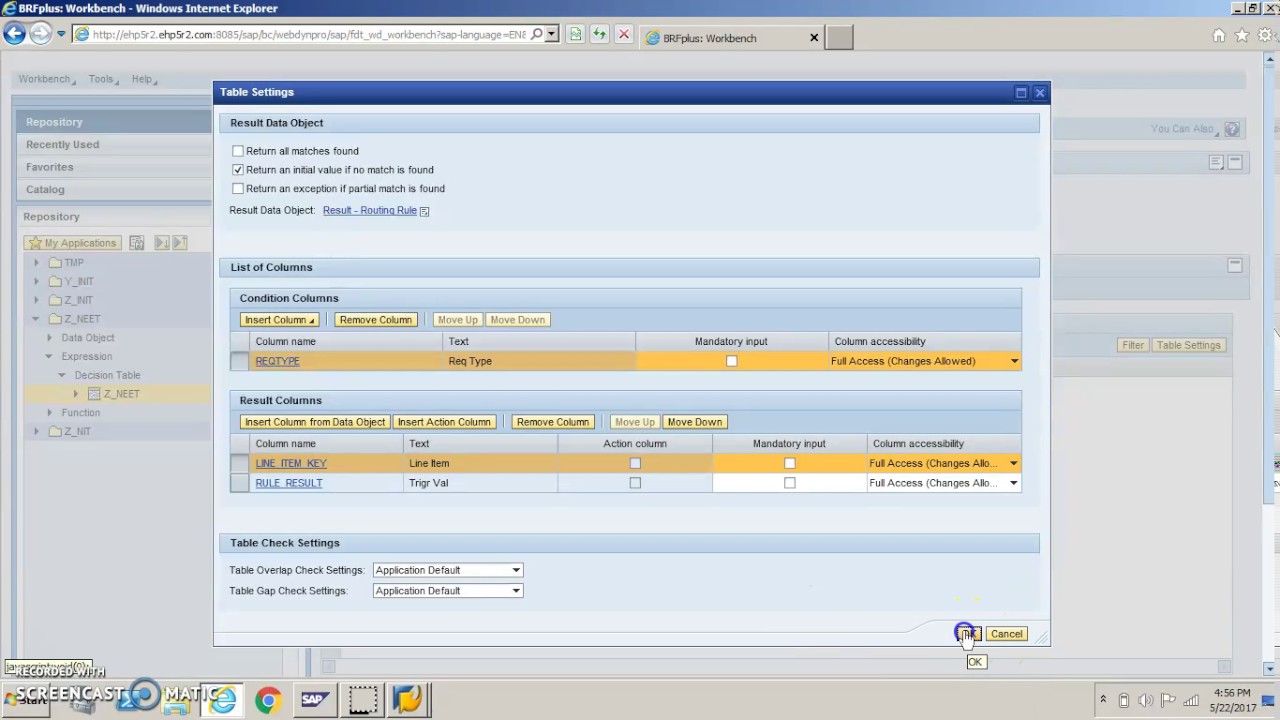
BRF+ Rule Framework
Business Rule Framework plus (BRF+) is used to define dynamic approval rules, default approvers, and conditional logic (e.g., high‑risk role requires two‑step approval).
2. Setting Up ARM
Define Request Types
Navigate to NWBC → GRC AC → Configuration → Access Request Management → Request Types.
Copy and tailor standard types (ZRRQ_ROLE, ZRRQ_EMERGENCY, etc.).
Configure Request Fields
Determine which fields appear on the request form (e.g., justification, validity dates, business area).
Use “Field Control” to make fields mandatory, optional, or hidden.
Maintain Workflow & Approver Determination
Assign each request type to a workflow template.
In BRF+, build a “Determine Approver” rule set that selects approvers based on organizational data (e.g., cost center owner).
SoD & Risk Integration
Link ARM to your SoD rule set (via Access Risk Analysis).
On submission, ARM invokes the risk engine; if conflicts arise, requests can be blocked, sent to risk owners, or overridden with documented justification.
3. Processing Access Requests
Submission
Users launch ARM from the GRC portal or embedded SAP GUI tile.
They fill out the form, attach necessary documents, and submit.
Automated Checks
Duplicate Request Check: Prevents identical pending requests.
SoD Risk Check: Runs in real time against the latest risk catalog.
Approval Workflow
Notifications are sent via email or in‑system work items.
Approvers can approve, reject, or forward with comments.
Provisioning
Upon final approval, ARM triggers provisioning connectors (e.g., to SAP IDM or direct SAP role assignment).
A completion notice and audit log entry are generated.
4. Monitoring & Auditing
Request Status Dashboard
Real‑time view of all requests by status (New, In Approval, Completed, Rejected).
Audit Trail
Every action—submission, approval, override—is logged with user, timestamp, and comments.
Reporting
Prebuilt Fiori reports and NWBC transaction GRACREQMON enable drill‑down on request volumes, approval times, and high‑risk requests.
5. Best Practices & Tips
Standardize Request Types: Limit custom request types to reduce complexity.
Automate Approver Rules: Leverage BRF+ to minimize manual maintenance of approval matrices.
Batch Processing for Bulk Changes: Use the Mass Approval and Mass Provisioning features for large user‑role assignments.
Regularly Review SoD Catalog: Keep risk rules up to date with evolving business processes.
Test in a Sandbox: Validate workflows and risk checks end‑to‑end before moving to production.
Any Queries ping me :[email protected]
Email : [email protected]
Reach me : +91 9346511644 ,+919381803376
WhatsApp : +91 9346511644 ,+919381803376
For Swift Response:
Feel free to reach me on WhatsApp at +91 9346511644 ,+919381803376 for any urgent queries or assistance related to the course GRC I'm available to help!
Повторяем попытку...

Доступные форматы для скачивания:
Скачать видео
-
Информация по загрузке: