frePPLe - How can I input my operators' shifts and holidays?
Автор: frePPLe
Загружено: 2019-07-01
Просмотров: 1330
Описание:
1) Navigate to Calendars in the Manufacturing menu.
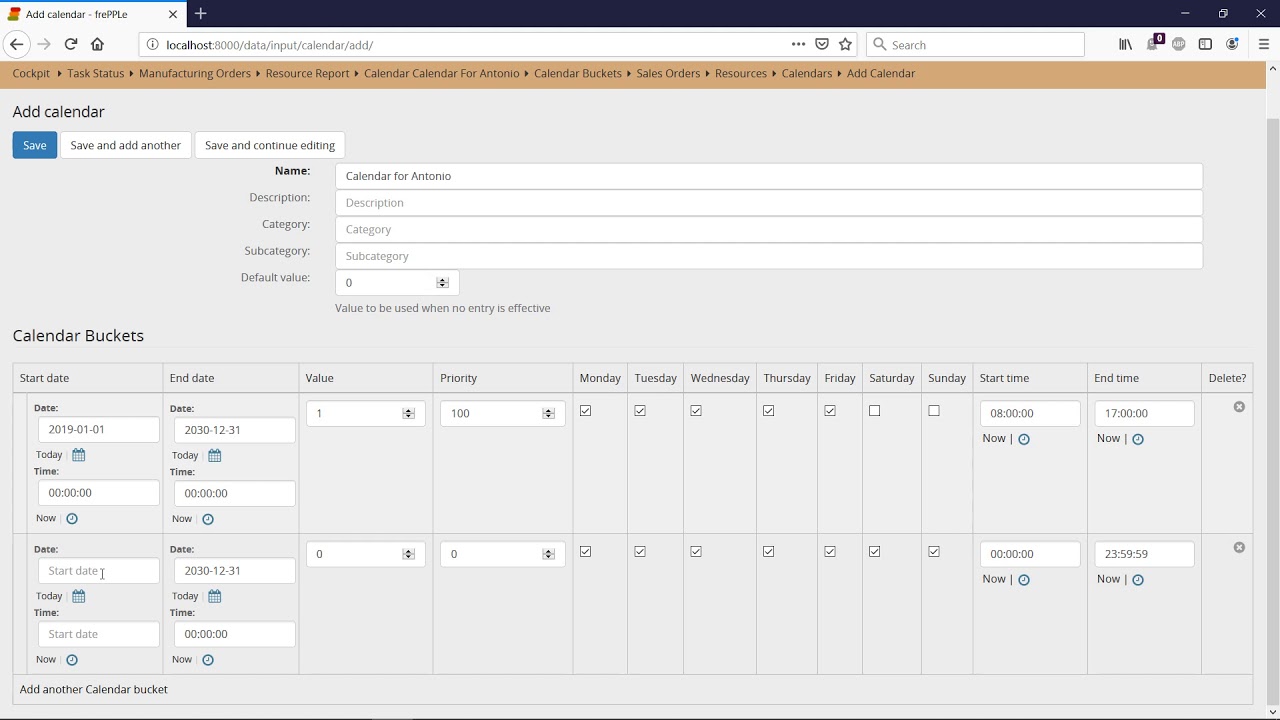
2) Click on the + icon in the upper right corner and add a new calendar for your operator with default value = 0 (for instance: Calendar for Antonio).
3) In Calendars Buckets, add another calendar bucket line with value = 1 for each availability of the operator.
4) For a shift, input a start date in the past and an end date far in the future, then select the days, start and end time of the shift.
5) For holidays, simply set the start date and end date of the period.
6) Navigate to Resources in the Capacity menu and input the calendar's name in the Available column.
frePPLe is an open source production planning and scheduling cloud software for the manufacturing industry.
Повторяем попытку...
Доступные форматы для скачивания:
Скачать видео
-
Информация по загрузке:














![KRYM PO 12 LATACH OKUPACJI PUTINA - SZPITALE WOJSKOWE ZAMIAST SANATORIÓW [BOJKE]](https://imager.clipsaver.ru/9wOp5s-3yRU/max.jpg)

