SolidWorks Project for Beginners: Designing a Walking Beam Mechanism | Part 7
Автор: Design&Slice
Загружено: 2025-12-17
Просмотров: 12
Описание:
Welcome to Part 7 of my Walking Beam Mechanism series!
00:00 - Part 16 Preview and Dimension
00:10 - Part 16 Start Modeling
04:50 - Part 17 Preview and Preview
05:00 - Part 17 Start Modeling
08:40 - Part 18 Preview and Dimension
08:55 - Part 18 Start Modeling
12:33 - Part 19 Preview and Dimension
12:43 - Part 19 Start Modeling
🎯 Series Goal:
In this series, we will learn and grow together by rebuilding real industrial mechanisms from the ground up.
By reverse-engineering and redesigning these systems inside SolidWorks, we will improve our mechanical design skills, understand real-world engineering principles, and become better engineers—step by step.
I’m also learning on this journey, and I want to take you with me.
I’m not a professional yet, but with every mechanism we rebuild, we develop, improve, and build our engineering skills together.
This series is about growing side by side—one mechanism at a time.
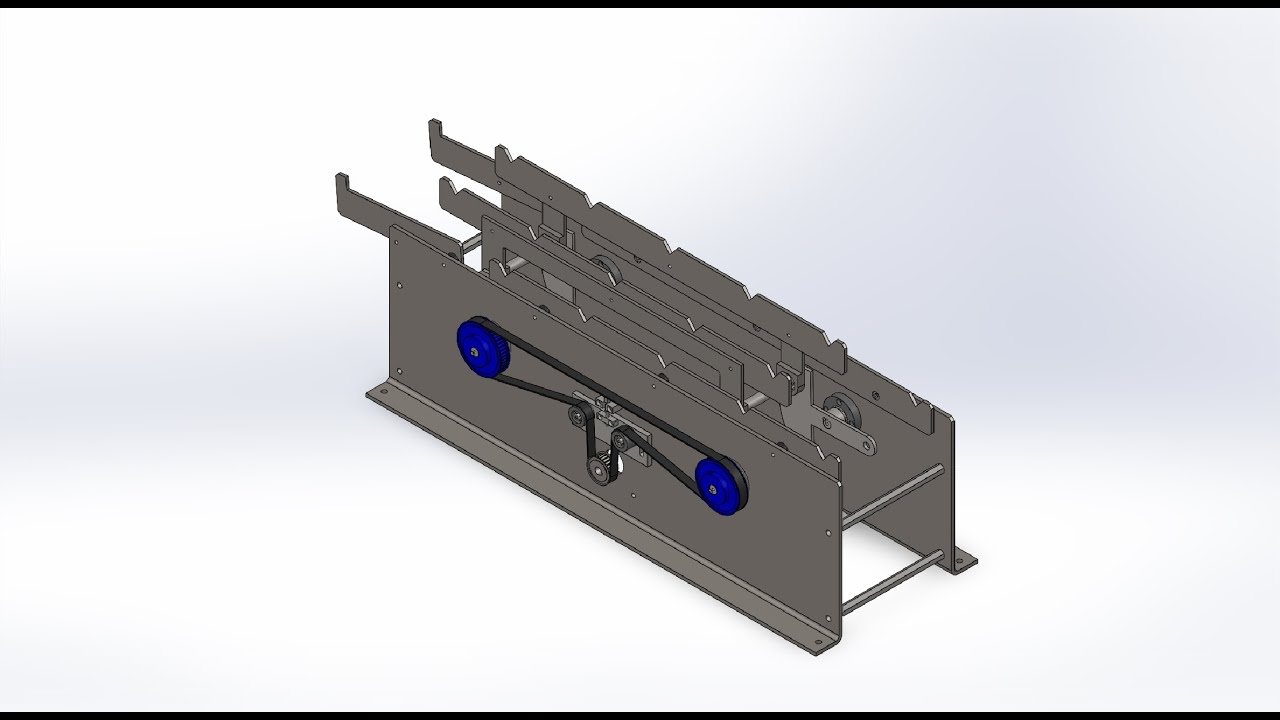
In this episode, I rebuild a complete Lift & Carry Walking Beam Mechanism driven by an eccentric shaft.
This mechanism is commonly used in industrial automation to move cylindrical parts step-by-step with high precision.
🔧 What you will see in this video:
• Full reconstruction of the walking beam mechanism in SolidWorks
• How the lift & carry motion works
• Modeling workflow and clean mechanical design
• Overview of the rollers, linkages, and beam movement
• Introduction to the step-by-step feed concept (indexing)
🎯 Mechanism Overview:
The Walking Beam is a lift-and-carry system used to transport aluminum cylinder parts (Ø20 x 200 mm) from one slot to the next.
Using an eccentric shaft, synchronized belts, and a linkage system, the mechanism lifts the parts, carries them 150 mm forward, and places them accurately for inspection or further processing.
This series will cover:
✔ Full rebuild of every component
✔ Motion explanation
✔ SolidWorks modeling techniques
✔ Mechanical engineering insights
✔ Preparation for motion analysis in later parts
At the end of this series, we will 3D-print the entire mechanism, assemble all the components, and bring the Walking Beam system to life.
This will allow us to test the motion physically and see how the mechanism performs in real life.
📌 If you enjoy mechanical design, automation, and SolidWorks modeling, make sure to follow the full series!
👍 Like the video
💬 Comment what mechanism you want next
🔔 Subscribe to see Part 2, Part 3, and more advanced mechanical projects
⚠️ Disclaimer & Credits: This project is based on a standard design from the Misumi Library. This video is for educational purposes only to teach SolidWorks modeling and simulation skills. I do not claim ownership of the original design concept; all rights belong to Misumi.
#solidworks #walkingbeam #mechanism #engineering #cad #liftandcarry #automation #eccentricshaft #solidworkstutorial
#solidworkstraining #solidworkslesson #solidworksbasics #solidworksbeginner #solidworksforbeginners #cadtutorial #mechanicaldesigntutorial #3dprinting #3dprintedmechanisms #3dprint #additivemanufacturing #automation
#industrialautomation #manufacturing #engineeringprojects #machineDesign
Повторяем попытку...
Доступные форматы для скачивания:
Скачать видео
-
Информация по загрузке: