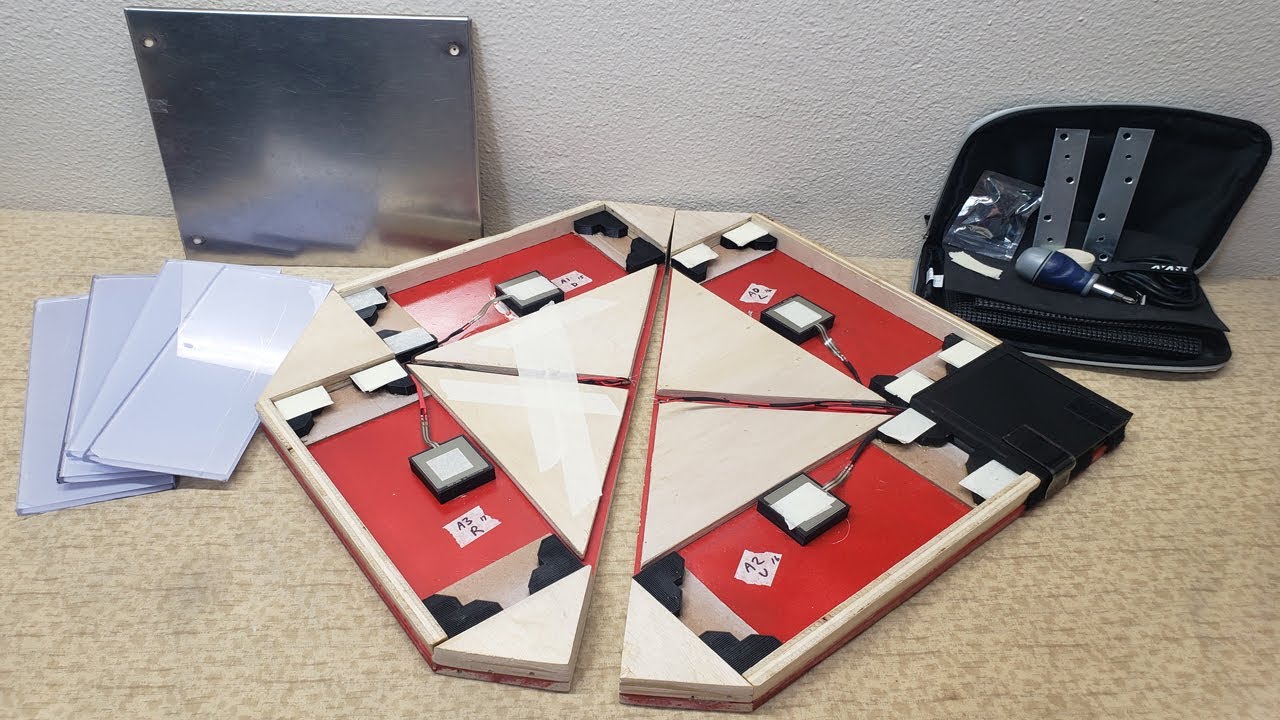
Building a USB Mini Portable Dance Pad with FSR and Arduino (For Travel!)
Автор: s34nVideos
Загружено: 2022-02-06
Просмотров: 4494
Описание:
[Parts]
Teensy 4.0 (With Pins): https://amzn.to/34omcit
Mini Breadboard: https://amzn.to/3AZbFWW
Wood Glue: https://amzn.to/3rt0NgJ
FSR Model 406: https://buyinterlinkelectronics.com/c...
Wire (22 awg): https://amzn.to/3gtjxGE
Sandpaper: https://amzn.to/3rqwLu9
Orbital Sander (Use this OR Sandpaper): https://amzn.to/3J7RZmu
3/8" Polycarbonate (10 3⁄4" x 3 15⁄16"): https://www.tapplastics.com/product/p...
2' x 4' 1/2" Plywood: https://www.homedepot.com/p/1-2-in-x-...
Resistors (You can experiment better with a multipack): https://amzn.to/34fvRrR
[Parts (If cutting the pad in half!)]
Metal brackets: https://amzn.to/35UrxP9 (Drill more holes for extra support)
4-Pin Molex Connector: https://amzn.to/3sm8XGZ
Wood Screws: https://amzn.to/3uuqY8M
[Tools]
JigSaw: https://amzn.to/3gnGlYy
JigSaw Blades: https://amzn.to/3B2QDa7
Circular Saw (For cutting the pad in half): https://amzn.to/3gpHvCC
Soldering Iron + Solder (Cheap!): https://amzn.to/3grmHuF
Solder Flux (Optional): https://amzn.to/3HvrDKJ
------------
As mentioned in the video, the pad is based on a design by Teejusb.
So thanks to him for a lot of the work!
You can see the guide here: https://github.com/teejusb/teejusb-pad
There are a few caveats, I will list them below!
Wood Cutting:
You can laser cut OR use a jigsaw. When using a Jigsaw, use a ruler to make sure your cuts are as accurate as possible.
3D Printing:
MANY MANY public libraries offer 3D printing for free! Take all the designs to the library and get them printed. Easy!
My Parts are too snug!
If the center panel is a tight fit in the socket, then it can put force on all sensors. This is no good! It's important not to make everything overly snug. Just right or on the looser end is better. If this is the case, and everything is glued down, then it's not a problem to shave a little off the plexi-glass parts to get the right fit.
Resistors:
TIP: The LARGER the resistance, the LESS weight is needed.
TIP: For FA play, you would probably go with 150ohms.
330ohm (I.e. orange, orange, brown, gold) - Seems like the standard, but we could maybe afford to go lower.
1k Ohms - THis is VERY sensitive, pretty much unplayable as even the inconsistences in the hardware trigger the arrows. Even standing on the center panel, trigged them.
-------------
[Installing WEBUI for Changing Sensitivity Thresholds]
These are gotchas for installing the WebUI on Windows 10:
1. OPEN COMMAND PROMT WITH ADMIN ACCESS, OTHERWISE, PYTHON CANNOT FIND LIBRARIES IT NEEDS.
ITLL THROW ERRORS ON THE SERVER.PY FILE I.E. SERIAL CANNOT BE FOUND ETC
2. If setting this up on a new computer with different file path, then remove the 'venv' directory as it stores hardcoded full file paths
3. If this line fails: "yarn install && yarn build && yarn start-api"
You will need Windows C++ Build tools to compile Node modules. Installing the Node .msi SHOULD have already done this with the installer, but sometimes its just an ass****
You can use the Visual Studio installer: "vs_BuildTools.exe"
Select: Workloads - Desktop development with C++, then for Individual Components, select only:
Windows SDK
C++ x64/x86 build tools
4. 'serial' not found
This means Python cannot find any of the modules you installed. I.e. the line "pip install -r requirements.txt" downloaded them, but python still cannot find them.
I created an ENV VARIABLE called PYTHONHOME and put the home dir to python there as its value, THEN deleted the venv directory, and re-ran all of the required lines again.
Once setup, don't move or rename any of the folders containing thre WebUI.
Once setup, create a profile for each user using the WebUI (Top right corner).
When you create your first profile, a profiles.txt file will appear.
TIP: Close the python server if you edit profiles.txt manually, otherwise, they wont save!
#DanceDanceRevolution #DancePad #DanceMat
Video Title: Building a USB Mini Portable Dance Pad with FSR and Arduino (For Travel!)
Video File Created Date: Saturday, 5 February, 2022 (Video may or may not have been captured on this date, it shows the date the video was last converted.)
-- Video uploaded and managed using YouTube Bulk Uploader for the Lazy!
-- http://ginkosolutions.com/youtube-bul...
Video Tags:
building, fsr, mini, portable, dance, pad, for, travel, portable dance pad, dance pad, travel pad, in the groove, dance dance revolution, ddr, itg, pump it up, piu, konami, force sensitive resistors, teensy, video gaming, diy, diy dance pad, home made, usb ddr dance pad, arduino, diy dance dance revolution mat, home made dance dance revolution pad, diy project, diy ddr mat, diy ddr pad, fsr travel pad, build guide, how to, guide, tutorial
Повторяем попытку...
Доступные форматы для скачивания:
Скачать видео
-
Информация по загрузке:




![[Time-lapse] Produção do Dancepad Pump It Up Elite + barra de apoio #DFG #PUMPITUP](https://image.4k-video.ru/id-video/5oqc_LTEov4)
