📦 How to Submit E-Invoice for Foreign Supplier (Taobao) – Trading Item | E-Invoice Series EP8
Автор: EIST | SQL & E-Invoice Malaysia Tutorials
Загружено: 2025-06-04
Просмотров: 1683
Описание:
Welcome back to our E-Invoice Onboarding Series!
In this episode, we’re diving into how to handle foreign suppliers—specifically platforms like Taobao—when it comes to submitting a self-billed e-invoice for trading goods.
🔍 Scenario Covered:
Your company purchases goods from Taobao to resell to customers (i.e., trading stock).
✅ Step-by-step in SQL Software:
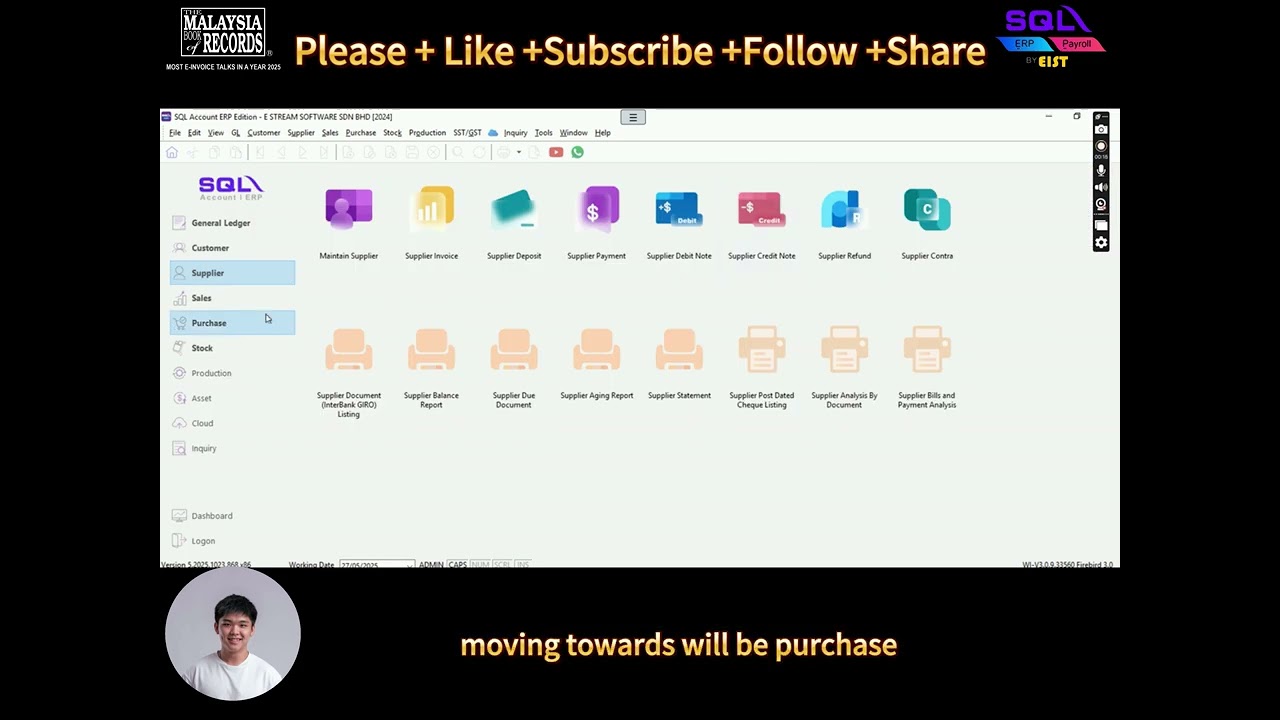
Maintain Supplier
Create a new supplier profile for Taobao
Select "Self-Billed" under E-Invoice submission type
Choose Classification Code: 034 – Importation of Goods
Under Tax → TIN Number, select: EI00000000030 – Foreign Supplier
Create Purchase Invoice
Fill in transaction details including item description
Confirm the classification code is set to 034
Go to MyInvois button → Select Submit E-Invoice
🎯 That’s it! You’ll receive a validated UUID & QR code as usual.
🛎️ Next Episode Preview:
We’ll show you how to record foreign purchases as company expenses using Cash Book Entry in SQL.
🔔 Like, Subscribe & turn on the Bell icon to stay updated with the latest Malaysia E-Invoice news and tutorials!
#sqlaccounting #einvoice #电子发票 #einvoicing #eist
Повторяем попытку...
Доступные форматы для скачивания:
Скачать видео
-
Информация по загрузке:












![⚓ [E-INVOICE] 开Self-Billed 必知的10种情况](https://imager.clipsaver.ru/PMobtHjyvuU/max.jpg)

![Wstawaki [#2165] Strona](https://imager.clipsaver.ru/d1hSLPPEoBI/max.jpg)