How To Get Your 30 Day Trial Of LeadPages For Just $1
Автор: Andrew Stewart (The Art Of WordPress)
Загружено: 2015-08-20
Просмотров: 6660
Описание:
Start your trial: http://cm.theartofwp.net/lptrial30
Leadpages has redesigned their website. Watch the updated video here: • How To Get A 30 Day Leadpages Trial For Ju...
If you've ever wanted to give the most popular landing page software a try to see if it's right for you first, there is a way to try it out for 30 days and it will only cost you $1.
Here's how to do it...
Transcript:
Hi, guys. Andrew from The Art of WordPress here. In this video, I'm actually going to be showing you how you can try out Lead Pages for just $1.
When you get to the LeadPages homepage, you can see a bunch of options up here. You can see Pricing, Marketplace, get Lead Pages button. Even if you scroll down the page, there's nothing that mentions a $1 trial or even a free trial. Now, if you're anything like me, you want to try out this software before you commit to anything. So even if you were to click Get LeadPages button up here, you'd think that if there was any type of trial available, it would be here, but you're taken immediately to the pricing.
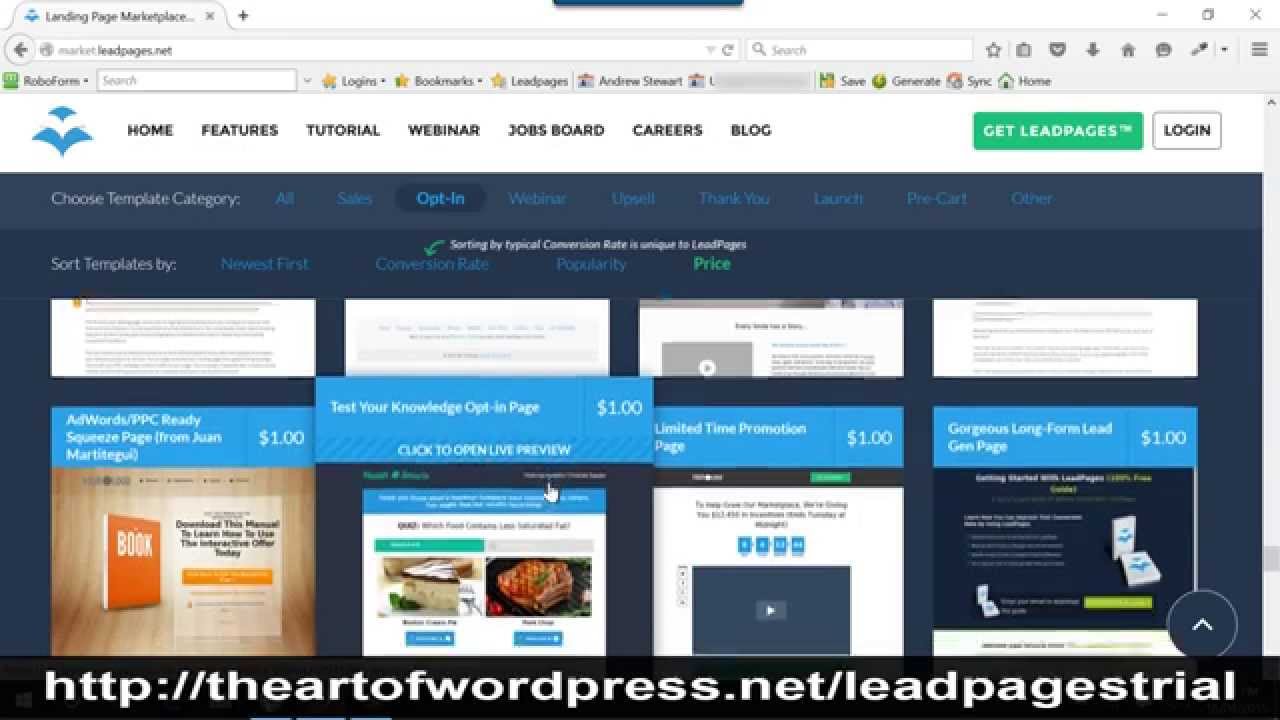
So from the Lead Pages homepage, click on Marketplace. Now, when you get to the LeadPages Marketplace, just scroll down, click on Price, and this will sort them from high to low. Now, scroll all the way down to the bottom, it may take you a while. It will refresh a few times, add more pages, all the way to the bottom. And eventually you will get greeted with, under the heading Free To All LeadPages Customers. Now, you'll start to see pages down here for $1.
Now the beauty of this is that any page you buy for $1, you also get a 30-day LeadPages trial because you obviously need the software to be able to host this page. And that is pretty much how you do it. So pick one of these pages that you actually like. Let's just go with this one here, this might be for an opt-in form for your giveaway. Once that's loaded, at the top here, it says Purchase for $1, so click on that. Now, you're not going to have a Lead Pages account if you haven't done it before. So down here, you get a full 30 days of LeadPage standard monthly subscription. We'll charge you $1 today for the template and $297 a year after your 30-day trial period.
Now, the only thing that you need to be mindful of is once you purchase it, make sure you bookmark this date or at least two days before so you can at least cancel your subscription. Or if you don't want to be charged a full year, you can just change your subscription to monthly instead, which would be $37 for the basic plan. So make sure you bookmark this date because I don't want you getting to the end of the 30-day trial and then you just get $297 slapped on your credit card. So that's the only risk there is with doing this free trial, is you've got to remember to go back at least two days before and change your subscription options.
Enter your contact information. Once you've entered all your details, including your credit card information, click "I've read and agree with LeadPages' terms of service." And you'll see down here, your order summary. So there's your free trial of LeadPages right there for 30 days, and you're only paying $1 today for the template. So Create Account and Purchase Template, click that button and you'll be taken to the LeadPages Thank You page.
Now, log into the email address that you set up with LeadPages, go to open that email. So to log in, just click on this LeadPages link here, now your email address, just paste your password in there and log in. All right. So when you've done that, you'll be taken to this page where you need to enter a subdomain, and that's really just how your URL links are going to look for LeadPages that you create. So in this instance, I would just type "The Art of WordPress". And what's going to happen is pages that I generate through LeadPages are going to be TheArtofWordPress.LeadPages.co.
Now, remember, there is a WordPress plugin that will allow you to customize the URL, and you should definitely do that, especially if you're going to be running Facebook ads to any of these LeadPages because Facebook doesn't allow at the moment LeadPages URL. And then click Continue...
Okay, guys, thanks for watching. Click this link http://theartofwordpress.net/leadpage... and it'll take you straight over to LeadPages so you can sign up for your $1 trial. All right, thanks again. Talk to you soon. Bye.
Disclaimer: The link in this video is my affiliate link, so if you choose to continue your subscription with Leadpages after your trial period I do make a commission. It costs you nothing extra but helps support future videos like this one. Your support is appreciated.
Повторяем попытку...
Доступные форматы для скачивания:
Скачать видео
-
Информация по загрузке: